



 The primary mechanism of hiring and appointing full-time faculty continues to be through an in-person appointment. In rare circumstances the unit may identify a special faculty hire opportunity for which a remote appointment is possible and mutually advantageous.
To be considered for a full-time remote position, employees in Workgroup F must be non-tenure earning, or a tenured associate or full professor (tenure-earning faculty are not eligible), and must be hired into a position designed for remote work. If your job is eligible for Fully Remote, UAB Human Resources and the Office of the Provost will determine your eligibility.
For more information on eligibility and guidelines for fully remote faculty, visit the Alternate Work Options FAQs page.
-
Getting Started
If you are eligible to be Fully Remote Faculty, and your supervisor has confirmed that you are approved, follow the next steps below.
- Complete Training for UAB Faculty
- Submit Hybrid/Remote Agreement (must be accessed via campus network, VPN or Remote Desktop)
- Review Information Technology Hybrid/Remote Work Policies
-
Alternate Work Options Process Flow
Select a category below.
Alternate Work Options Process Flows: Faculty
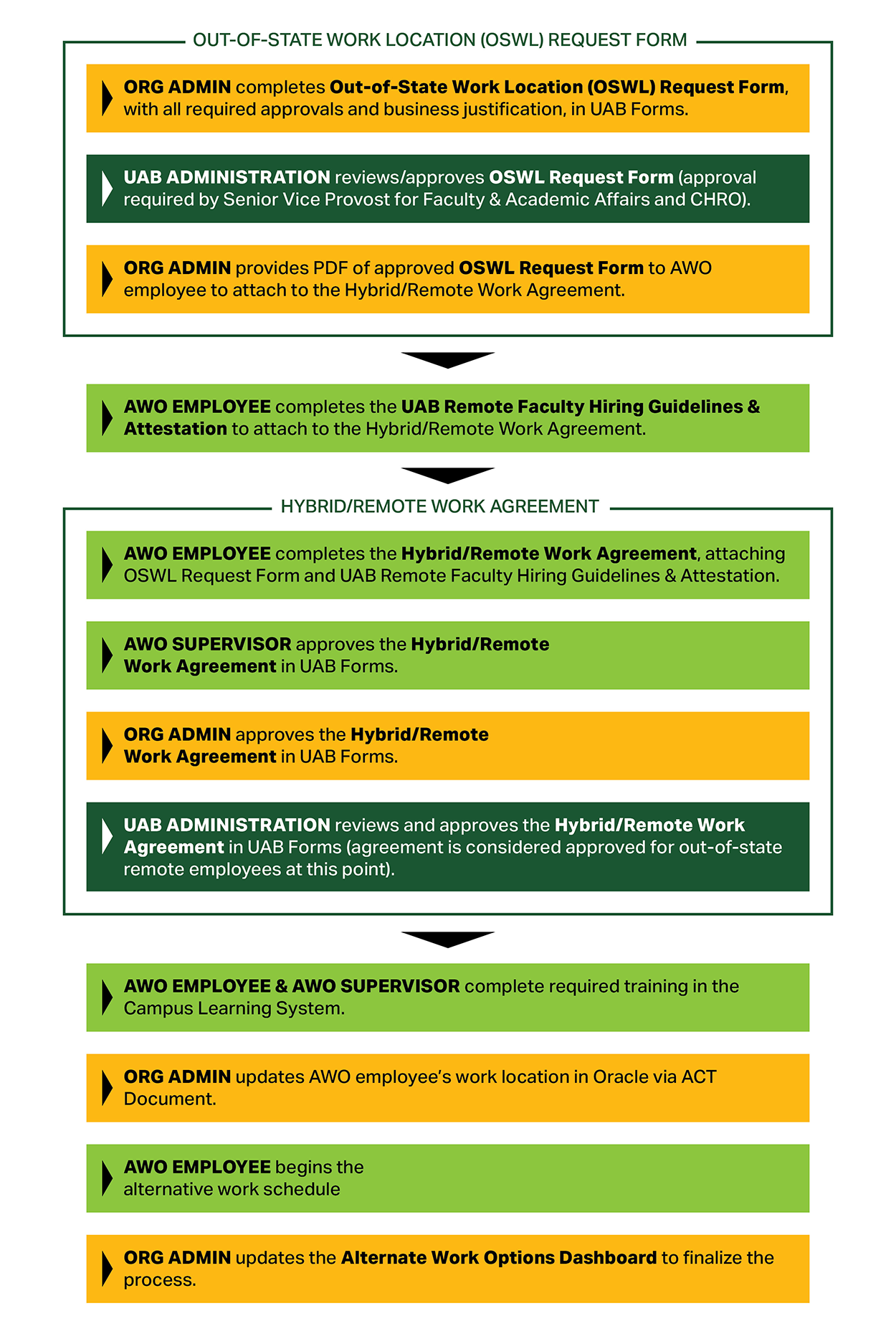
Out-of-State Fully Remote Faculty
- Process Step 1: Org Admin completes Out-of-State Work Location (OSWL) Request Form, with all required approvals and business justification, in UAB Forms.
- Process Step 2: UAB Administration reviews/approves OSWL Request Form (approval required by Senior Vice Provost for Faculty & Academic Affairs and CHRO).
- Process Step 3: Org Admin provides PDF of approved OSWL Request Form to AWO employee to attach to the Hybrid/Remote Work Agreement.
- Process Step 4: AWO Employee completes the UAB Remote Faculty Hiring Guidelines & Attestation to attach to the Hybrid/Remote Work Agreement.
- Process Step 5: AWO Employee completes the Hybrid/Remote Work Agreement, attaching OSWL Request Form and UAB Remote Faculty Hiring Guidelines & Attestation.
- Process Step 6: AWO Supervisor approves the Hybrid/Remote Work Agreement in UAB Forms.
- Process Step 7: Org Admin approves the Hybrid/Remote Work Agreement in UAB Forms.
- Process Step 8: UAB Administration reviews and approves the Hybrid/Remote Work Agreement in UAB Forms (agreement is considered approved for out-of-state remote employees at this point).
- Process Step 9: AWO Employee & AWO Supervisor complete required training in the Campus Learning System.
- Process Step 10: Org Admin updates AWO employee’s work location in Oracle via ACT Document.
- Process Step 11: AWO Employee begins the alternative work schedule
- Process Step 12: Org Admin updates the Alternate Work Options Dashboard to finalize the process.
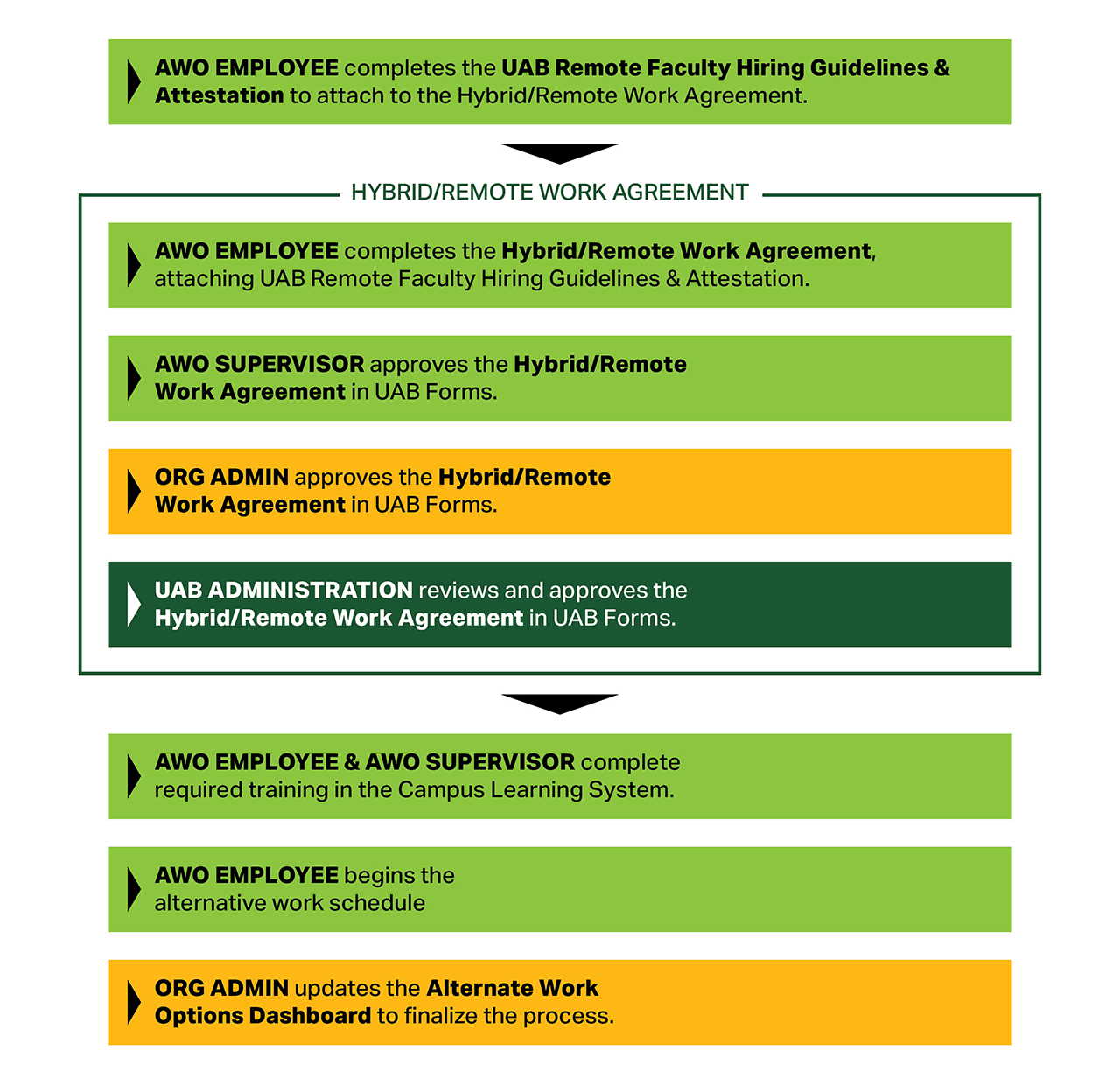
In-State Fully Remote Faculty
- Process Step 1: AWO Employee completes the UAB Remote Faculty Hiring Guidelines & Attestation to attach to the Hybrid/Remote Work Agreement.
- Process Step 2: AWO Employee completes the Hybrid/Remote Work Agreement, attaching UAB Remote Faculty Hiring Guidelines & Attestation.
- Process Step 3: AWO Supervisor approves the Hybrid/Remote Work Agreement in UAB Forms.
- Process Step 4: Org Admin approves the Hybrid/Remote Work Agreement in UAB Forms.
- Process Step 5: UAB Administration reviews and approves the Hybrid/Remote Work Agreement in UAB Forms.
- Process Step 6: AWO Employee & AWO Supervisor complete required training in the Campus Learning System.
- Process Step 7: AWO Employee begins the alternative work schedule
- Process Step 8: Org Admin updates the Alternate Work Options Dashboard to finalize the process.
Alternate Work Options Process Flows: Staff
All Participants (existing and new) In-State Employees
- Process Step 1: Dashboard is updated by the Org Admin in the Alternate Work Options Dashboard.
- Process Step 2: Hybrid/Remote Work Agreement is submitted by the employee.
- Process Step 3: Supervisor (from Oracle) approves Hybrid/Remote Work Agreement.
- Process Step 4: Org Admin (from HR roles app) approves Hybrid/Remote Work Agreement. For all in-state hybrid/remote employees only, the Work Agreement is now considered approved.
- Process Step 5: Employee/Supervisor complete training in the Campus LMS.
- Process Step 6: Employee begins alternative work schedule.
- Process Step 7: Dashboard is updated by the Org Admin in the Alternate Work Options Dashboard.
Out-of-State Remote Employees
- Process Step 1: Out-of-State Work Location Request Form with approvals is completed by the Org Admin.
- Process Step 2: Dashboard is updated by the Org Admin in the Alternate Work Options Dashboard.
- Process Step 3: Hybrid/Remote Work Agreement is submitted by the employee.
- Process Step 4: Supervisor (from Oracle) approves Hybrid/Remote Work Agreement.
- Process Step 5: Org Admin (from HR roles app) approves Hybrid/Remote Work Agreement.
- Process Step 6: Hybrid/Remote Work Agreement is reviewed and approved by UAB Administration. For out-of-state hybrid/remote employees, the Work Agreement is now considered approved.
- Process Step 7: Employee/Supervisor complete training in the Campus LMS.
- Process Step 8: Org Admin (from HR roles app) updates work location in Oracle via ACT Doc.
- Process Step 9: Employee begins alternative work schedule.
- Process Step 10: Dashboard is updated by the Org Admin in the Alternate Work Options Dashboard.
New Hires and Re-hires, Hybrid/Remote Jobs
- Process Step 1: Hiring Managers/Org Admins/HM collaborators indicate on the PAR/CRF form if the job posting work arangement is remote/hybrid/onsite.
- Process Step 2: Hiring Managers/Org Admins/HM collaborators/recruiters proceed with the recruitment process for the job posting as usual.
- Process Step 3: If the hybrid/remote candidate is in-state, proceed to Step 5.
- Process Step 4: If the remote candidate is out-of-state, Out-of-State Work Location Request Form is completed by the Org Admin and reviewed and approved by UAB Administration.
- Process Step 5: Recruiters move forward with background check and offer process.
- Process Step 6: Post-offer process by Org Admins is the same for out-of-state remote employees.
HR Departments
- Benefits & Wellbeing
- Compensation
- Employee Assistance & Counseling Center
- HR Information Systems
- HR Service Center
- Learning & Development
- Records Administration & Compliance
- Talent Performance & Relations/Consultants/Investigators
HR Services & Programs
- Disability Management/AWARE Program
- Employee & Family Counseling
- Employee Recognition
- Financial Wellness
- HR Communication
- HR Generalist/Consultant Services
- Leave Management
- On-the-Job Injury/Illness Program (OJI)
- Performance Management
- Temporary Staffing
The position of Chief Human Resources Officer (CHRO) oversees UAB Human Resources. The following divisions report to the CHRO:
Benefits & Wellbeing
- Benefits
- Employee Wellness
- Employee Assistance & Counseling Center
Human Resources Services
- HR Central Support
- HR Finance
- HR Communications
- HR Service Center
- Talent Acquisition
HR Systems Operations
- HR Information Systems
- Records Administration & Compliance
Compensation
- Compensation
Learning & Development
- Learning & Development
Investigations
- Investigations
Talent Relations
- Talent Relations
- AWARE Disability Management Program
- On-the-Job Injury/Illness
HR Updates
-
Deadline to file annual ethics report is April 30
As a public institution, UAB employees who meet certain criteria are required by the state of Alabama to complete an annual Statement of Economic Interests Form. As required by law, the UAB Human Resources provides the Alabama Ethics Commission...
-
Deadline approaching for UAB’s Premium Assistance Program
The Premium Assistance Program is designed to ease the cost of medical premiums for benefits-eligible employees whose total combined household income, based on family size, is at or below twice the federal poverty level (see 2026 Premium Assistance Income...
-
HRIS launches Empower U to provide employees real-time support for administrative systems
The HR Information Systems (HRIS) team is launching HRIS Empower U, a new weekly Zoom session designed to give employees real‑time help with administrative systems — no ticket submission required. Each Wednesday from 10-11 a.m., participants can...
-
Reminder: Employees can review job title, pay grades and pay rates anytime in Oracle
Employees can use Self-Service Applications in the Oracle HR and Finance Administrative System at any time to review and verify current job titles, pay grades and pay rates. Self-service stations are available in the UAB Administration Building...